Retail / cafe operations · POS / Inventory / Sales Dashboard
Point of Sale (POS) System
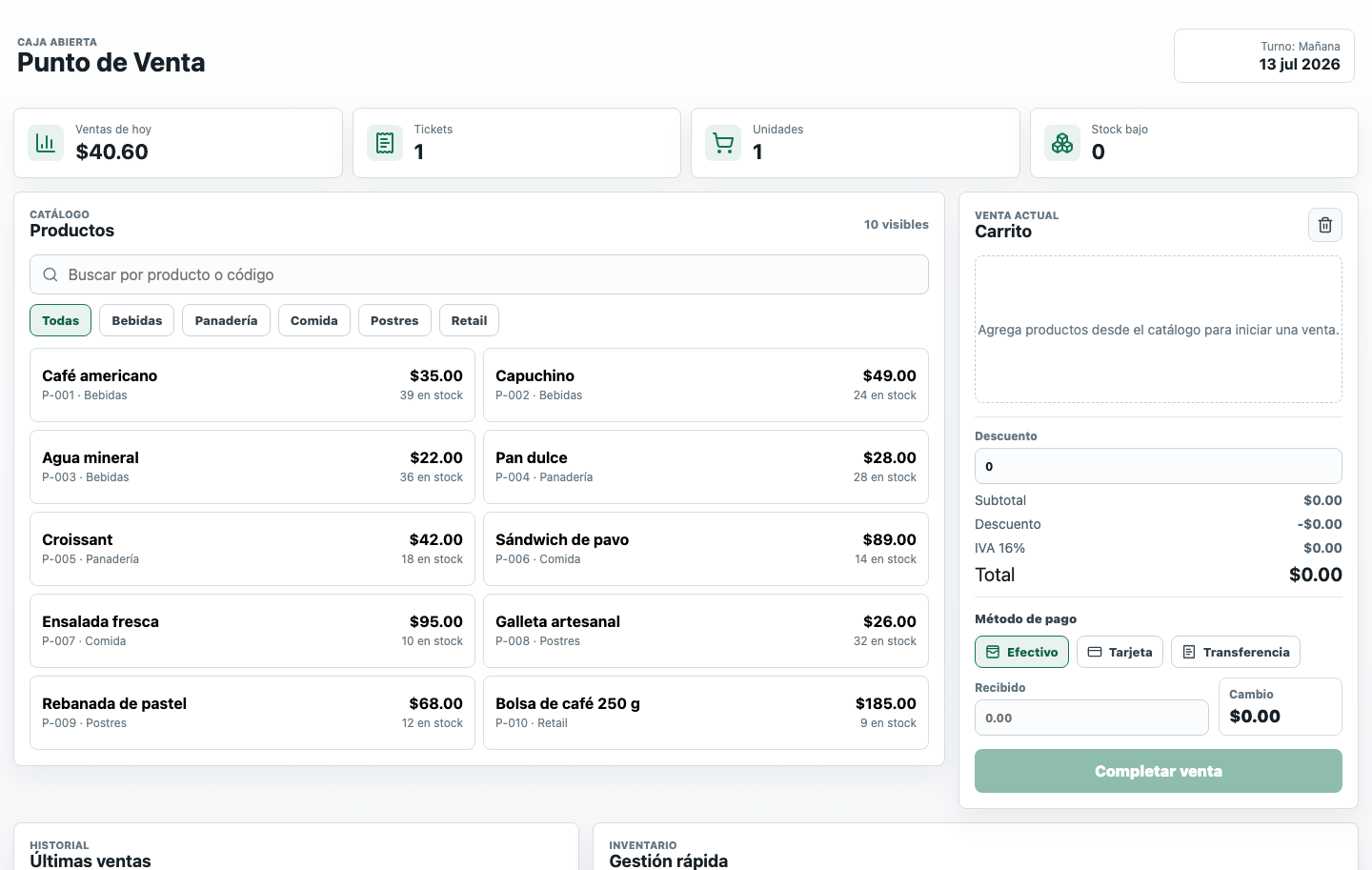
A point-of-sale app with product catalog, cart, payment methods, inventory visibility, receipt printing, and sales history.
Public POS demo deployed on Render.
Overview
A point-of-sale app with product catalog, cart, payment methods, inventory visibility, receipt printing, and sales history.
Business context
A small retail or cafe operation needed a fast POS workflow for taking sales, tracking payment methods, watching stock, and reviewing recent tickets without relying on a spreadsheet.
Problem
Sales, payments, ticket history, and stock levels are easy to lose when the counter workflow depends on separate notes, manual totals, or disconnected spreadsheets.
Constraints
- Spanish-language interface for daily cashier use
- Fast product search and category filtering
- Clear cash, card, and transfer payment handling
- Printable receipts without adding unnecessary back-office complexity
Solution
Built a live POS system with a searchable product catalog, cart, discounts, multiple payment methods, inventory indicators, ticket printing, recent sales history, and dashboard totals for the day.
Before / after workflow
Before
Counter sales, payment totals, stock checks, and ticket records could be scattered across notes or spreadsheets.
After
A single POS screen handles catalog lookup, cart totals, payment method, receipt printing, stock visibility, and recent sales history.
Modules
- Product catalog
- Cart and checkout
- Payment methods
- Inventory visibility
- Receipt / ticket printing
- Sales history
- Daily dashboard
Key features
- Product catalog
- Search and categories
- Cart and discounts
- Cash, card, and transfer payments
- Inventory visibility
- Receipt and ticket printing
- Recent sales history
- Daily sales dashboard
Architecture or workflow
Product catalog and sale state → cart and payment workflow → ticket printing → sales history and daily dashboard.
Technology
VEP responsibilities
- POS workflow design
- Catalog, cart, and payment UI
- Inventory and low-stock indicators
- Receipt and ticket printing flow
- Static deployment to Render
Result
- Delivered a public demo POS that can be opened from the portfolio.
- Created a clear counter workflow from catalog search to completed sale.
- Added receipt printing and recent sales history so tickets are reviewable after checkout.
What was learned
- POS screens need dense information, but actions still have to stay obvious for counter staff.
- Receipt printing is part of the core sale flow, not a later reporting detail.
Next possible phase
- Persistent backend for real stores
- Barcode scanner support
- Role-based cashier and admin access
Ready to centralize a key operation?
Use ERP as the premium upgrade path: start with one module, or explore the demo platform built with demo data.